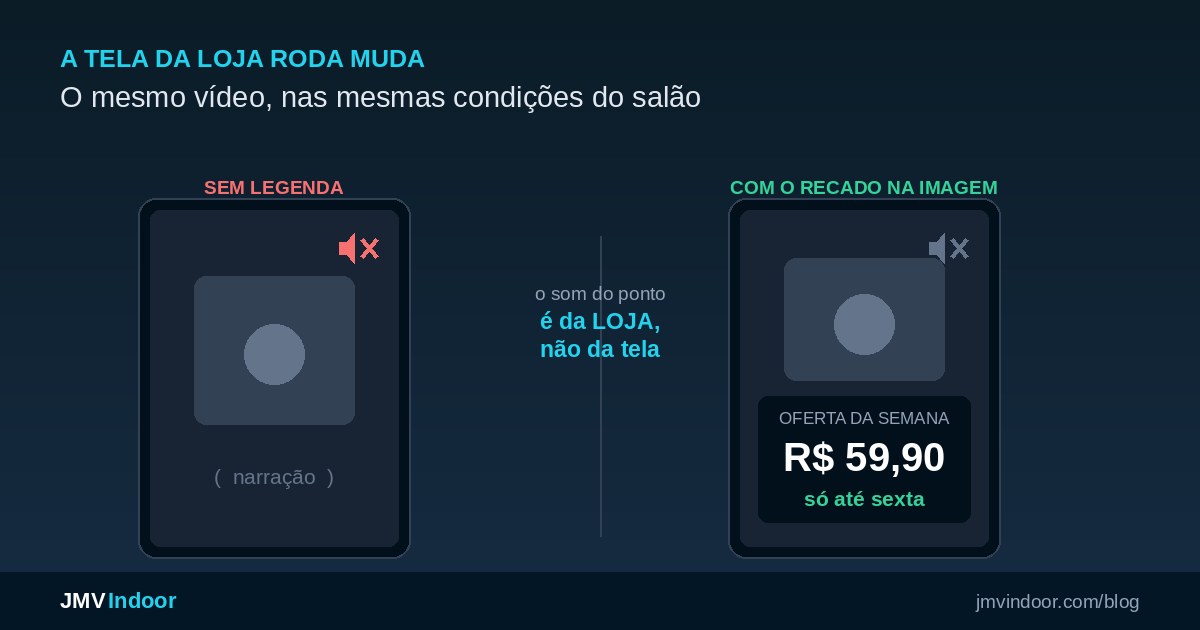
Indoor TV runs muted in almost every commercial environment: the audio of a retail floor belongs to the store — background radio, conversation, movement — not to the screen. That is why every video shown needs captions or text baked into the image: if the information exists only in the narration, it simply never reaches the customer. The cheapest shortcut is the social media piece your team already produces — a Reel is born vertical and usually already captioned. And when there is no video at all, an image carrying the price, the offer terms or a before and after in large type works better than a pretty landscape.
The sound of the store was never the screen's
Before discussing captions, one premise needs fixing. A screen installed inside a store, a reception area or a waiting room does not own the audio of that space. The sound of the room already exists and already has an owner: the radio playing on the floor, the background music, the conversation at the counter, the street noise when the door opens. The TV arrives in a place where the auditory channel is taken.
This is not a technical limitation of indoor TV — it is how retail works. A customer walking between shelves with background music playing will not stop to listen to a narration coming out of a screen three metres away. Even if the volume were loud enough, it would be competing with the sound the store itself chose to put there.
The practical consequence is direct: indoor TV lands through what is seen, not through what is heard. Everything else in this article follows from that.
"Sound really is sensitive. That is why indoor TV lands more through what is seen than through what is heard. And captions, obviously, are fundamental." Passage from the Café & Tech Podcast episode on vertical indoor TV (4 December 2025, in Portuguese), at 15min40s. Translated from the original.
"Good for absolutely nothing": what gets lost
The phrase is deliberately blunt, and it is literally the position defended in the episode: a vertical screen without captions is good for absolutely nothing. Either the piece has captions, or it is an illustrative image with the text interactions inside it. There is no third option that works on a silent screen.
Think about what is lost when a narrated video goes to the screen without text:
- The price. "Was 89, now 59" spoken as audio, in a store, is information that never existed.
- The terms. "Until Friday only", "when you buy two", "for instant payment" — that is the part of the offer that converts, and it disappears with the audio.
- The product name. The customer sees packaging going by with no way to connect it to what is being said.
- The call to action. "Ask at the counter", "talk to a sales assistant", "point your camera" — if the instruction is spoken, nobody acts on it.
What is left on the screen is coloured movement. It fills the space, it burns loop time and it does not sell. It is worse than having no screen, because it costs money and creates the impression that communication is happening.
When sound actively hurts — the loudspeaker van
Here is a step further that almost no content about digital signage takes: in many cases, sound is not neutral, it is negative. The analogy used in the episode is the loudspeaker van driving down the street blaring an advert at eight in the morning on a Saturday. It does communicate. It is just that the effect on the listener is the opposite of a sale: instead of interest, it triggers irritation — and an irritated customer does not buy.
"And you have to be very careful with audio, because silence bothers nobody. Sound, depending on how it is used, can bother people. (…) Instead of buying, I get angry, I don't buy." Same episode, at 14min42s. Translated from the original.
The asymmetry is the heart of the argument: a silent piece never bothers anyone; a badly dosed noisy piece bothers everybody on the floor, including your own staff, who hear the same loop eight hours a day. Silence is the safe default — and captions are what turn that safe default into actual communication.
The two reasons to caption (and the part everybody knows)
There are two, and both are worth naming because they get confused:
- Accessibility. A deaf or hard-of-hearing person receives from the screen exactly what is written on it — and nothing beyond that.
- Getting the message across. Everyone else, who hears perfectly well, will not hear it either: the channel is taken. For them, captions are not an accessibility feature, they are the content itself.
Caption formatting is the least original part of this conversation — and it is already well answered everywhere. In one line, so it does not take over the article: sans-serif type at a large size, high contrast (light text on a semi-transparent dark band, never white text directly over a bright image) and short sentences, because the customer is walking by. If your piece meets those three, formatting is settled.
What is not settled anywhere is what comes next: what to do when the caption has to survive a network of screens, which piece to use when there is no video, and how much text actually fits.
Captions burned into the file or text from the player?
There are two ways to put text on an indoor TV piece, and the choice changes your operation the moment you have more than one screen.
Burned-in captions means text baked into the video file at export time. Upside: it looks the same on any screen, in any player, depending on nothing. Downside: it is immutable. Price changed, promotion date changed, a word came out wrong — you re-export and upload again.
Player text is the layer your indoor TV system draws on top of the video. Upside: the change is made once, from the cloud, and lands on every screen. That is what makes the difference when you run five stores and the same notice has to change in all of them by tomorrow morning.
In practice the combination is usually the answer: the spoken part goes burned in (it does not change), and the volatile data — price, date, unit, notice — lives in the player layer. If you are building your programming right now, this decision speaks directly to how long each piece should last: see how long the indoor TV loop should be to size how many pieces your customer journey supports.
The shortcut: your Reels are already vertical and already captioned
This is the most practical part of the article, and the one almost nobody connects. Your store probably already produces captioned vertical content every single day — it is just going only to social media. The marketing person, the sales assistant or whoever handles the store's channels records the Reel, and a Reel comes out vertical and, most of the time, already captioned.
That material is exactly the format a vertical screen needs. Reusing it is the shortest, cheapest route to filling your programming with pieces that communicate without sound — no production hire, no video editor. The full walkthrough of that reuse (including the reverse direction, from screen to social media) is in how to turn your indoor TV video into a social media post.
Two checks before sending a piece straight from the phone to the screen:
- Test the read from three metres. Reels captions were designed for a phone 30 centimetres from your face. On a 32-inch TV seen from the aisle, that same type size can be illegible. Open the piece on the screen and look at it from where the customer stands.
- Watch the interface area. App buttons, another network's watermark, progress bars and stickers sit exactly in the top and bottom bands. On the store screen they become clutter — and sometimes they cross the caption itself.
When there is no video: big text and before and after
Not every piece has to be video, and that is the way out for anyone without a production team. The right question is not "which video do I put on?", it is "what do I need the customer to know while they are here?".
The answer is almost never a landscape. Pretty stock imagery, drone footage over mountains, animated aquariums: all of it fills the loop and says nothing about your business. What works on a silent screen is content that is born written:
- An image with the message in large type. Product, price, terms. One idea per piece, in type readable from the far side of the floor.
- Before and after. The most underrated piece in service retail — salon, dentistry, aesthetics, weight management. Two photos side by side and one line of text sell better than any narration, and work perfectly in the silence of a waiting room.
- The "informative" piece. Operational notice, news, opening hours, house policy. Useful information written on the screen, which saves a question at the counter.
- Proof and reputation. A seal, a certificate, a recognition — as long as it is real and verifiable.
"Does it do anything for you to keep playing landscapes in your business? Absolutely nothing. (…) But where is your product? Where is the differentiator? Where is the before and after of what you do? If it's a salon, if it's dentistry, if it's aesthetics (…) where is the before and after that sells your service in the waiting room?" Same episode, at 16min20s. Translated from the original.
How much text fits: the rule for people reading in passing
The most common mistake of people who understood the captions lesson is the opposite of the first one: transcribing the whole narration onto the screen. The result is a block of text nobody finishes reading.
Whoever walks past a store screen reads from a distance and in passing. They do not sit, do not rewind, do not go back. The contract is different from video watched on a phone, where the person chose to be there. On the store screen you have the seconds in which the customer crosses the aisle or looks up from the queue.
The working rule:
| Situation on the floor | How much text per piece | Why |
|---|---|---|
| Aisle, customer moving | One short sentence — price or terms | 2 to 4 seconds of attention, standing and walking |
| Checkout queue, customer still | One sentence plus one supporting detail | More time, but attention is split with the service |
| Waiting room, customer seated | You can tell a story — before and after, step by step | Long dwell time and available attention |
The cut-off is simple: one idea per piece. If a piece needs two sentences to stand up, it is probably two pieces. And if the text only fits by shrinking the type, it does not fit — type size is the constraint, not the adjustment dial. This matters even more on a vertical screen, which holds less per line; if yours is not mounted yet, using an ordinary Smart TV rotated, with no dedicated kiosk, is what most stores do.
What if I do want sound anyway?
Wanting sound in the store is legitimate — and nothing above says otherwise. What this article argues is that audio work is a different job from visual work, and that it should not be solved as a free extra bundled with the screen's video.
Well-made ambient sound is its own project: music programming suited to the segment, jingles, time slots, volume calibrated to the type of room. There is a dedicated indoor radio product for that, including in JMV's own portfolio. What does not work is turning the TV audio on and expecting it to act as the soundtrack of the floor: it will compete with the sound that already exists, repeat the same loop all day in your staff's heads, and fall into the loudspeaker-van trap.
Want to test this on your own screen before paying for production?
JMV Indoor has a 30-day free trial and runs on the Smart TV you already own — enough to put up your first captioned piece and look at it from the aisle to see if it reads. Current pricing is always on the plans table. And if you want the full context of the vertical screen market, the complete Café & Tech episode is on YouTube (59min52s, published 4 December 2025, in Portuguese).
Are captions a legal obligation? The honest answer
This is the question that comes up most when accessibility enters the conversation — and it deserves precision, not a slogan. In Brazil there is no rule that speaks expressly about the screen inside a commercial establishment. But it is equally untrue that the law says nothing about it.
The Brazilian Inclusion Act (Law 13.146/2015) requires, in art. 67, that broadcasting services of sound and images allow closed captioning, a Libras interpreter window and audio description. In art. 69, §1, it extends the same resources to advertisements carried "in the written press, on the internet, on the radio, on television and in other open or subscription communication vehicles". A private screen inside your store, showing your own content, is automatically neither of those.
The point of attention sits in the same act, in its definition of a barrier in communication and information: "any impediment, obstacle, attitude or behaviour that hinders or makes impossible the expression or receipt of messages and information". In practice, the risk grows exactly when the essential information exists only in the audio — price, promotion terms, usage instructions, hazard warnings. Add to that the fact that regulated sectors (health, education, public services) and state or municipal laws may carry their own requirements, and that Law 10.098/2000 already treats the removal of communication barriers as general policy.
Frequently asked questions
Does the indoor TV in a store play with sound?
Do I have to caption every video that plays on the store TV?
Are captions on a store screen required by law?
Can I reuse the same Instagram video on the store TV?
How much text fits on an indoor TV slide?
What if I do want music or voice-over in the store?
Does vertical video need captions more than horizontal video?
In the end, all of this is a property of the medium, not a production detail: digital signage is a visual channel installed inside a room whose sound already has an owner. Whoever designs the piece accepting that from the start — with the message written into the image — communicates. Whoever uploads a narrated video and hopes someone will listen, does not. Not sure what to show on your screens? Talk to us through the contact form.